Who it's for · The problem it solves
Who it's for
Hotels, hostels, holiday rentals, campsites and property managers in Spain that run Odoo.
The problem it solves
Every guest must be reported to SES.Hospedajes within 24 hours. Retyping passports into the government portal is slow and easy to get wrong. Here the guest enters the data, Odoo checks it, and you get the file or send it directly.
Spanish accommodation providers must report every traveller to the Ministerio del Interior (SES.Hospedajes, Real Decreto 933/2021). This module lets you prepare those registrations in Odoo: guests can enter their own data before arrival, everything is checked against the SES rules, and you get the official XML file to upload or send it through the SES web service with your own credentials.
What it does
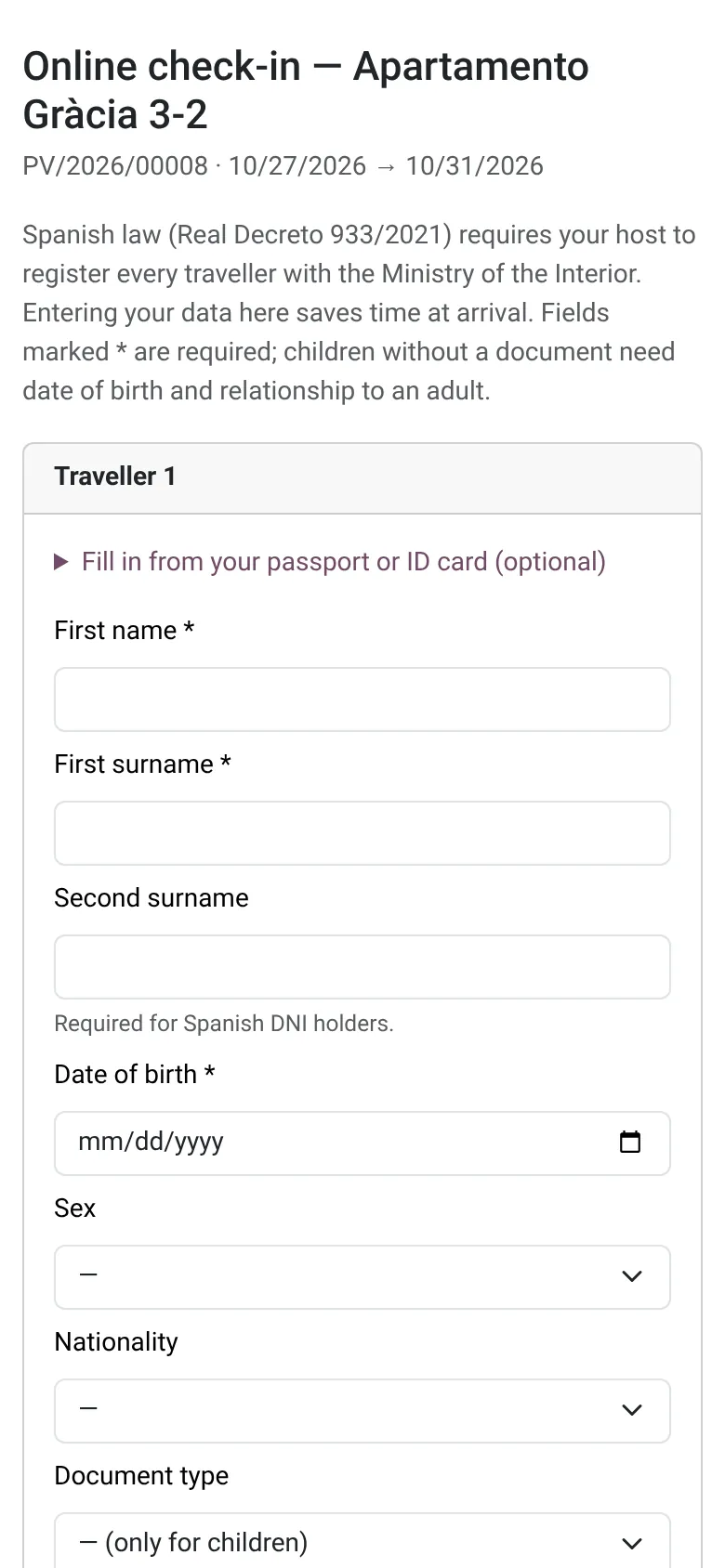
Guest self-check-in link
Send the guest one link before arrival. On a phone or computer they enter every traveller, or let the form read the lines at the bottom of their passport or ID card. No account or app needed. The link expires, can be revoked and never shows data already registered.
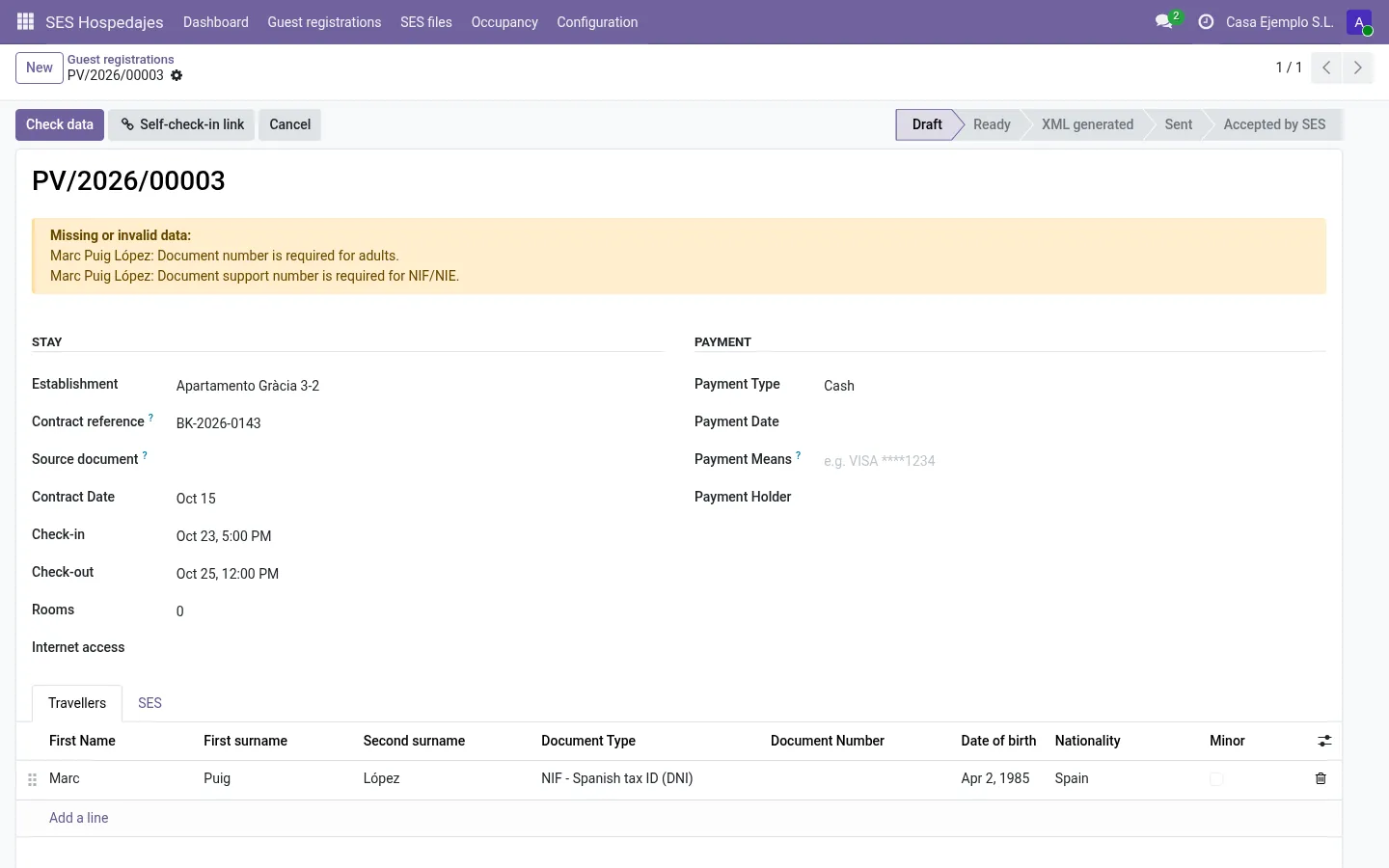
Checked before it leaves Odoo
NIF/NIE control letters, support number of Spanish documents, minors (relationship to an adult), INE municipality code, contact data, card numbers typed in payment fields and field lengths. Problems are listed per traveller.
Official XML or web service
Builds the official XML for the bulk upload (up to 100 registrations per file), or sends it through the SES web service with your own credentials: send, follow the status, see the communication code or the error, cancel. Test and production environments.
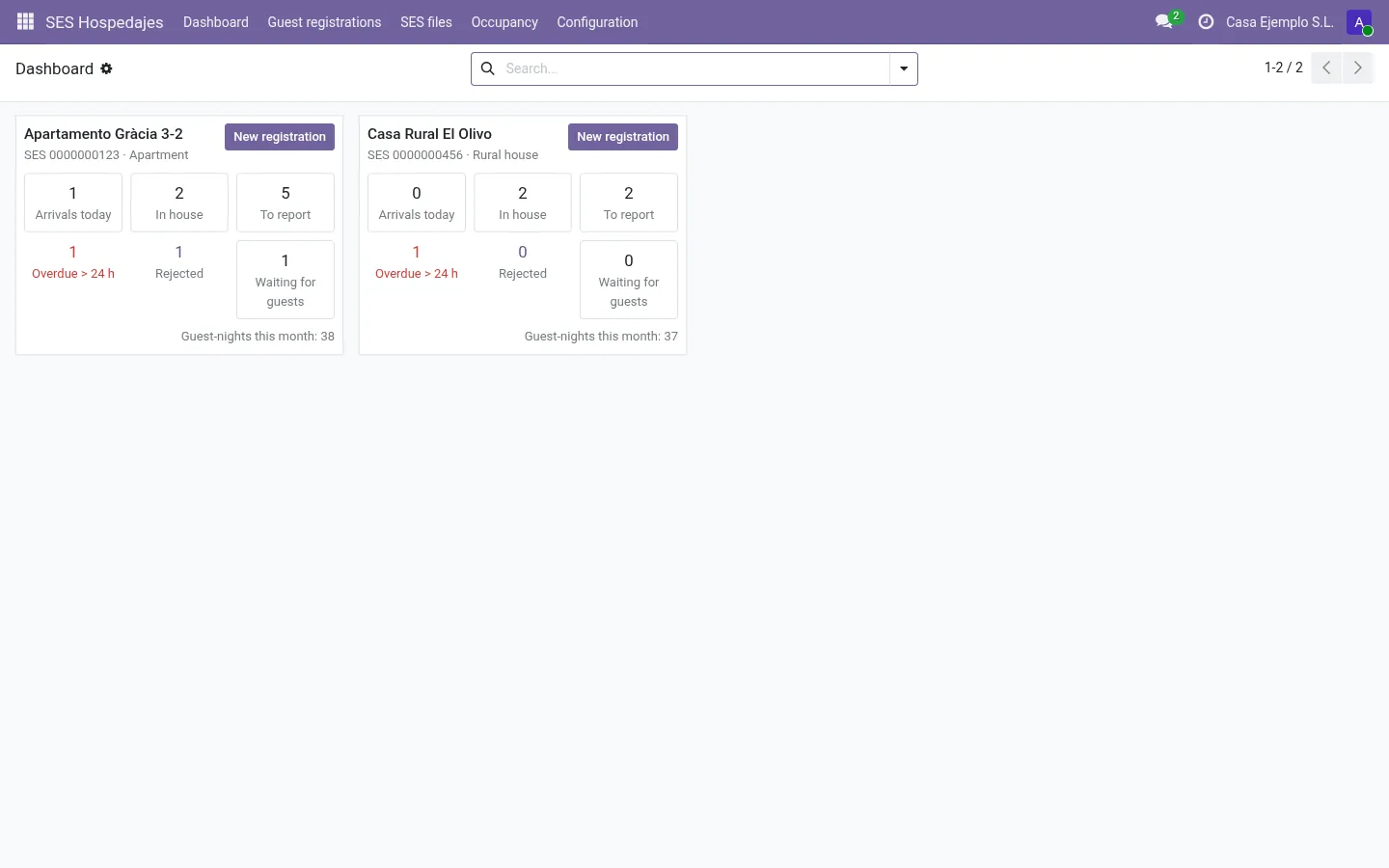
Dashboard and the 24-hour deadline
One card per establishment: arrivals today, guests in house, registrations to report, overdue, rejected and waiting for guests. Each registration shows its “report by” time in the establishment's own time zone.
Read the MRZ at the desk
Type or scan (keyboard-wedge reader) the machine-readable zone of a passport or ID card. Identity fields are filled in and check digits are verified. The MRZ itself is not stored.
Privacy by design
The guest form only asks for the fields of the registration and shows your privacy notice. Records are deleted after the retention period; generated XML files after a configurable number of days.
Before you start
- Register as a landlord in SES.Hospedajes (Ministerio del Interior) and note your código de arrendador and the código de establecimiento of each property.
- Optional: request web-service credentials from SES if you want to send directly from Odoo. You can start without them.
Install
- Buy and download the module for your Odoo version on the Odoo Apps Store, or install it from the Apps menu if your database is linked to your store account.
- Copy the folder
l10n_es_ses_hospedajesinto your addons path (on Odoo.sh: commit it to your repository) and restart Odoo. - In Odoo, open Apps, click Update Apps List, search for SES Hospedajes and click Activate / Install.
- Give users the group SES Hospedajes: User, or Manager for people who configure and send.
Guided setup
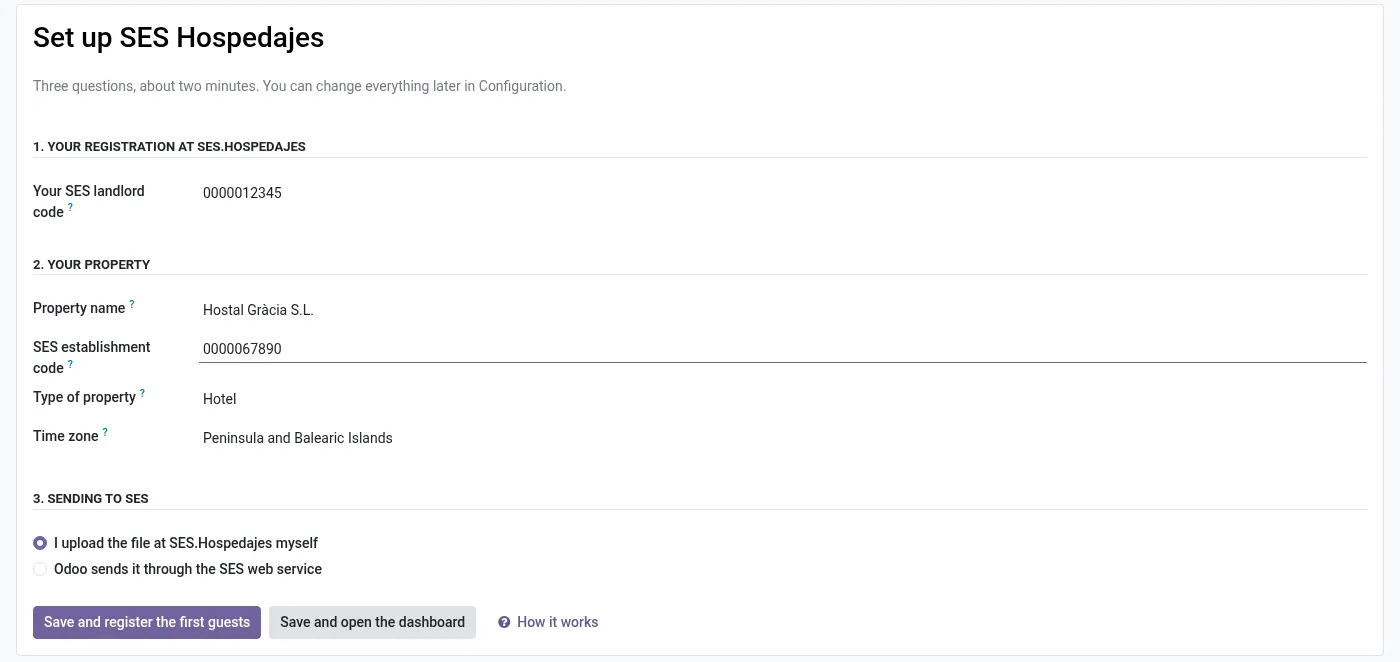
- After installation the setup assistant opens by itself. Type your landlord code and the establishment code (property name, type and time zone are pre-filled) and click Save and register the first guests.
- More properties: SES Hospedajes › Configuration › Establishments. Add each one with its establishment code and time zone (Peninsula, Canaries, Ceuta/Melilla).
- In Configuration › Settings, add the link to your privacy policy and an optional note for guests. If you have web-service credentials, enable the web service there and start with the Test environment.
- Check the retention settings. By default records are deleted 36 months after check-out and generated XML files after 30 days.
Daily use
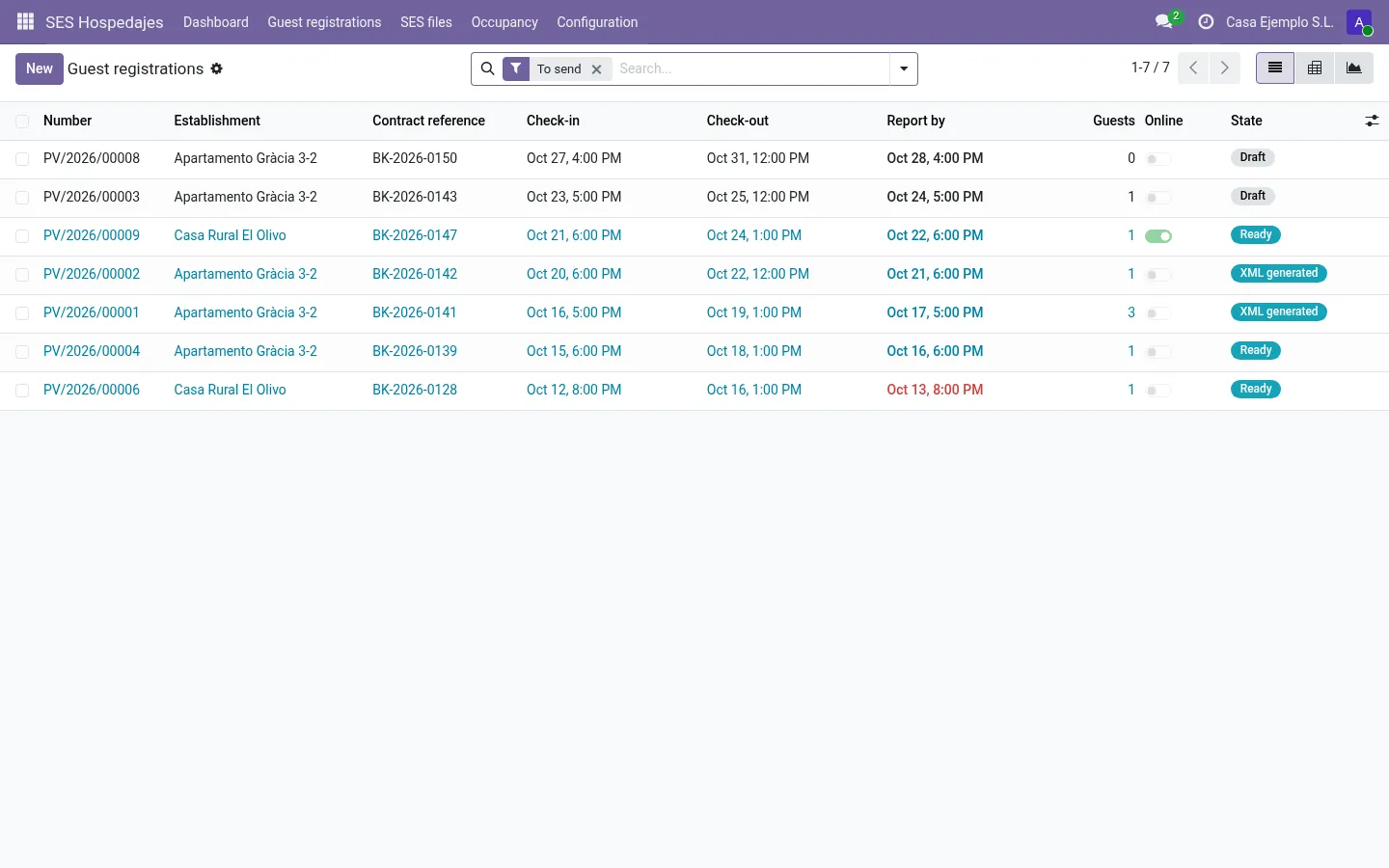
- For each booking, create a registration under Guest registrations › New: establishment, check-in and check-out, contract and payment data.
- Add the travellers yourself (optionally by reading the MRZ), or click Self-check-in link and send the link to the guest by e-mail or any channel.
- Click Check data. Fix anything listed in red.
- Click Generate SES file. Without the web service, download the XML and upload it in SES.Hospedajes (bulk upload of communications). With the web service, click Send to SES; the status is checked automatically.
- Keep an eye on the dashboard for overdue (more than 24 hours after check-in) and rejected registrations. Managers can cancel an accepted registration with Cancel at SES.
Screenshots
All screenshots show fictitious demo data.
FAQ
Do I need the SES web service?
No. Without it you download the XML and upload it in the SES.Hospedajes web application. The web service saves that step; you request the credentials from SES yourself.
Is the guest link safe to send by e-mail or messaging apps?
The link contains a long random code and Odoo stores only its fingerprint. It expires (by default after 14 days, and never before check-out + 1 day), you can revoke it, and it only lets guests add travellers. It never shows documents or addresses already registered.
Does the guest page need the Website app?
No. It is served by Odoo itself, without JavaScript, on Community and Enterprise.
Which languages does the guest page speak?
Every language installed in your Odoo; the guest can switch at the top of the page. The module ships English, Spanish, Catalan and Dutch.
Is any guest data sent to Normalane?
No. Data goes only to the Ministerio del Interior, and only when an administrator has enabled the web service and a user clicks Send.
Does it cover reservations, vehicle rentals or statistical surveys?
No. It covers traveller registrations (partes de viajeros). It is not a PMS or channel manager.
I am in Catalonia.
Guest registrations in Catalonia go to the Mossos d'Esquadra system. Check which channel applies to your establishment before using this module.
Does it work on Odoo Online?
No. Odoo Online does not allow third-party modules. Use Odoo.sh or an on-premise installation.
How do I install it?
Buy it for your Odoo version and download the zip from the store (or later from your orders page). Copy the folder into your addons path, update the apps list and install. On Odoo.sh, commit the folder to your repository. The Install section has every step.
What happens when I upgrade Odoo?
Since Odoo 13 the Odoo Apps Store sells each Odoo version of a module separately, so a new major version means buying the module for that version. Bug-fix updates within your version are free: download the latest zip from your orders page and replace the folder. Email us before a major upgrade and we will share any migration notes.
Does it work with several companies?
Yes. Data is kept per company with Odoo's standard multi-company rules.
How quickly do you answer support?
Email support@normalane.com or use the support button on your Odoo Apps Store orders page. A person reads every message and replies on working days (CET). Bug fixes for the purchased version are free.
Ready to use SES Hospedajes Spain?
€29, one-time, per Odoo version. Bought and downloaded on the Odoo Apps Store.
En español
Módulo para Odoo que prepara los partes de viajeros de SES.Hospedajes (RD 933/2021): enlace de auto check-in para el huésped, lectura de la MRZ, validación de NIF/NIE y código INE, XML oficial para la carga masiva o envío por el servicio web con sus propias credenciales, y control del plazo de 24 horas. Interfaz en español y catalán.
Official sources
Need help?
Email support@normalane.com with your Odoo version and edition (Community or Enterprise). Bug fixes for the purchased Odoo version are free.
Independent module, not affiliated with or endorsed by the Ministerio del Interior or Odoo S.A.