Who it's for · The problem it solves
Who it's for
Dutch companies that keep their books in Odoo, and the accountants who receive their auditfile.
The problem it solves
Your accountant or the Belastingdienst asks for an XAF auditfile, and older XAF versions are being phased out. This module builds an XAF 4.0 file from your Odoo books and checks it before you hand it over.
Accountants and the Belastingdienst ask for the Auditfile Financieel. The working group behind the format has announced that older XAF versions are phased out from 1 January 2027. This module exports XAF 4.0 straight from the books you keep in Odoo, checks every file against the official XSD and consistency rules, and prints a control report for your accountant.
What it does
A complete XAF 4.0 file
Company identity (Chamber of Commerce number, VAT number, address), customers and suppliers with balances, general ledger with RGS codes, VAT codes, periods, opening balance and all posted transactions per journal.
Checked before it leaves Odoo
A pre-flight check lists draft or unbalanced entries, a missing Chamber of Commerce or VAT number, accounts without RGS code and identifiers that are too long. Each file is then validated against the bundled XSD and the 10 consistency rules.
Control report for the accountant
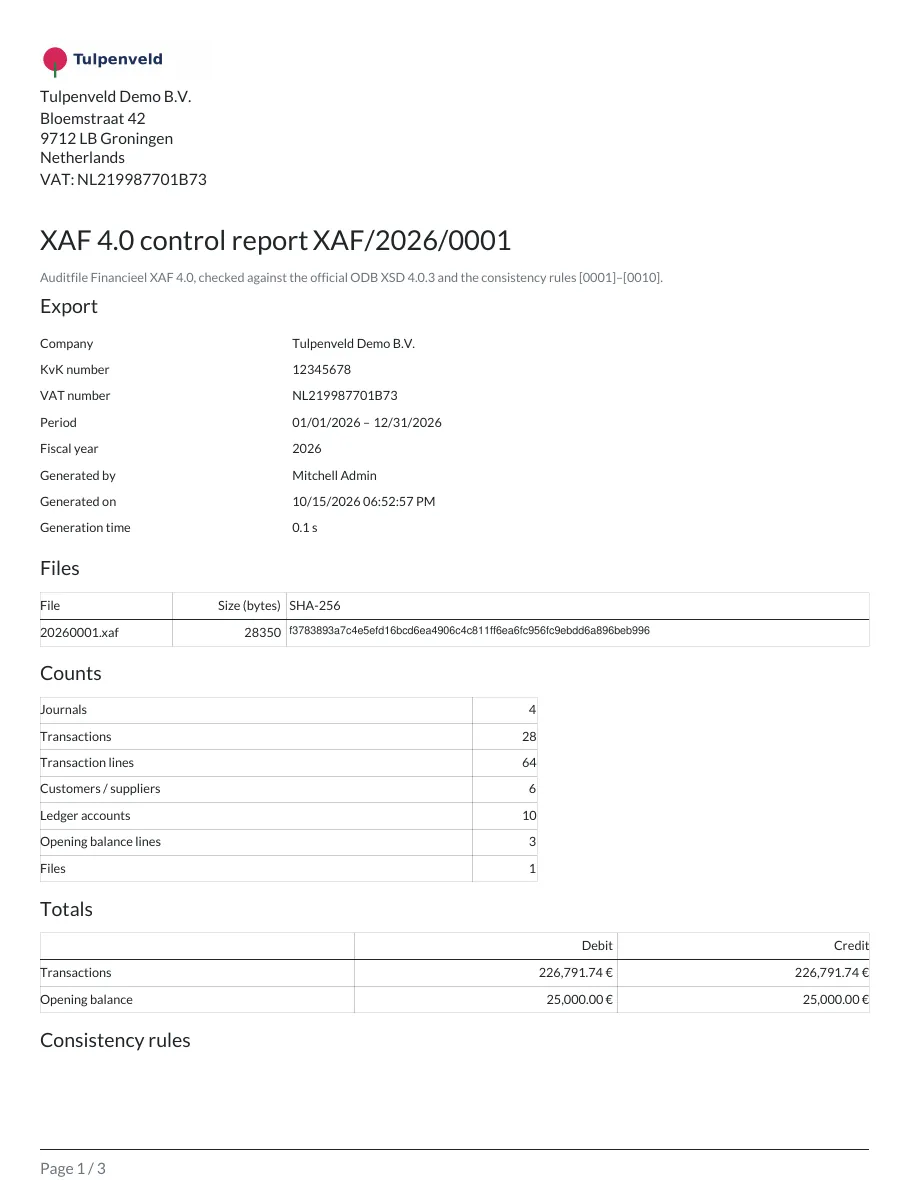
A PDF with file sizes and SHA-256, counts, totals, the result of every consistency rule, totals per journal and period, and a trial balance that ties to the file. Also as CSV.
Built for large ledgers
The file is streamed to disk, so memory use stays low. Large exports run as a background job.
Split, ZIP and audit trail
Optionally split the file at journal boundaries, download everything as ZIP, and keep the SHA-256 of every file with who generated it and when.
Validate any XAF 4.0 file
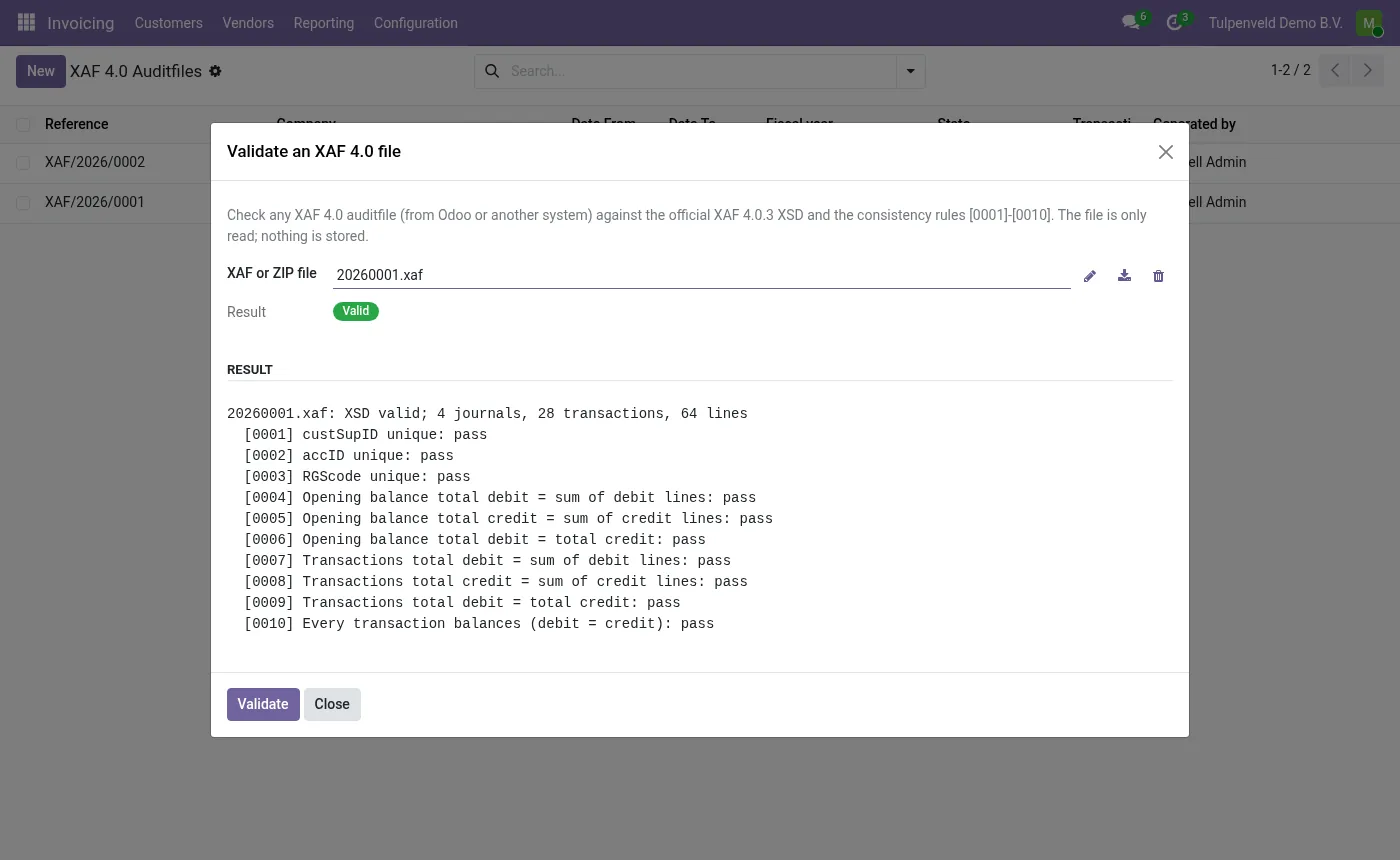
Upload an .xaf (or a ZIP with several parts) from any source and see the XSD result and every consistency rule. The file is only read, nothing is stored.
Before you start
- Make sure the company has its Chamber of Commerce number (company registry) and VAT number filled in.
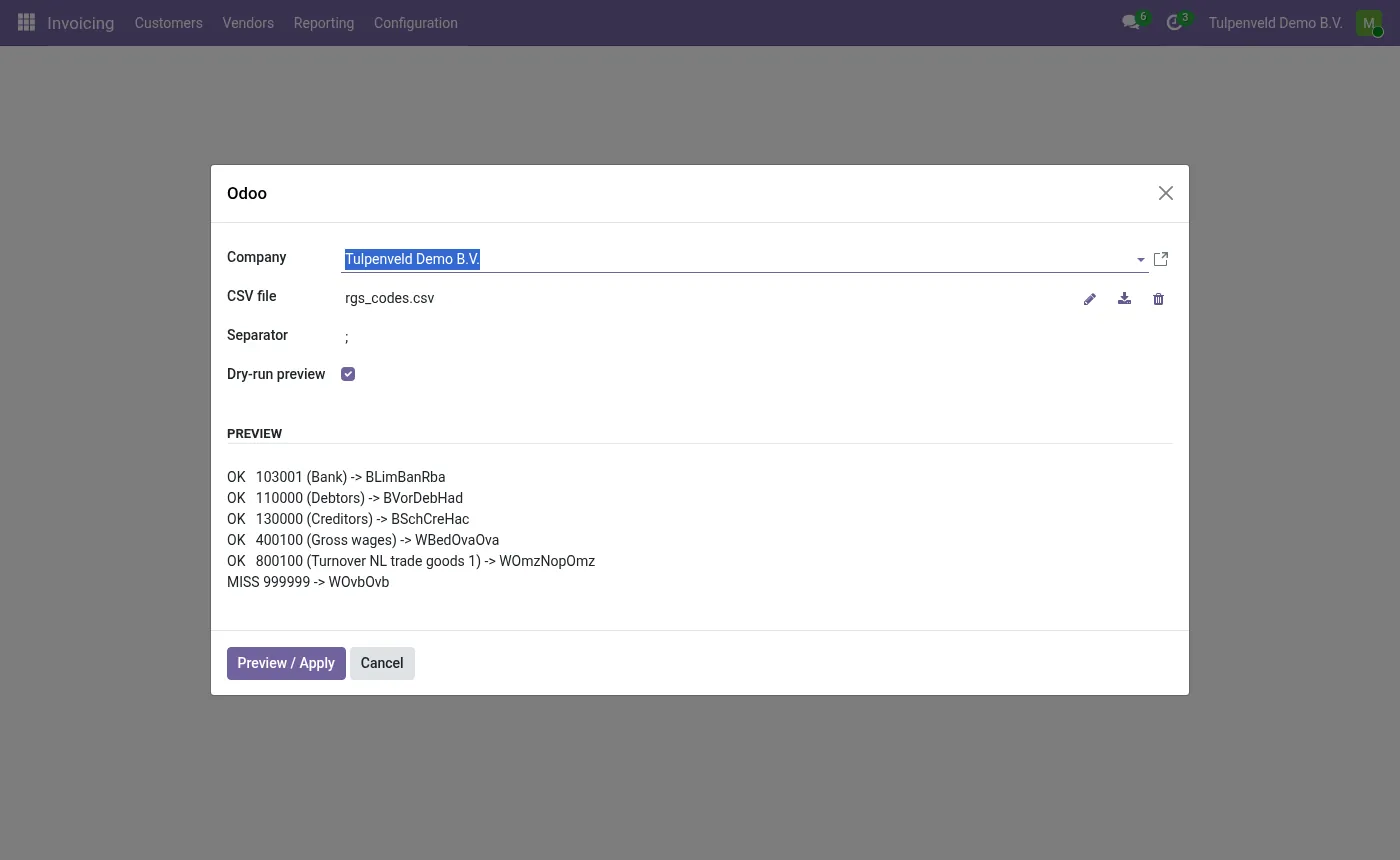
- Optional: have a list of RGS codes per account (CSV with
account code;RGS code).
Install
- Buy and download the module for your Odoo version on the Odoo Apps Store, or install it from the Apps menu if your database is linked to your store account.
- Copy the folder
l10n_nl_xaf4_auditfileinto your addons path (on Odoo.sh: commit it to your repository) and restart Odoo. - In Apps, click Update Apps List, search for XAF and install Dutch Auditfile XAF 4.0.
Guided setup
- Optional: set RGS codes on your accounts, one by one or with Import RGS codes in Settings › Invoicing/Accounting › Netherlands XAF 4.0. The import shows a preview first. The RGS version is set there too.
- Optional: check the XAF journal type on journals whose type differs from the default mapping.
Daily use
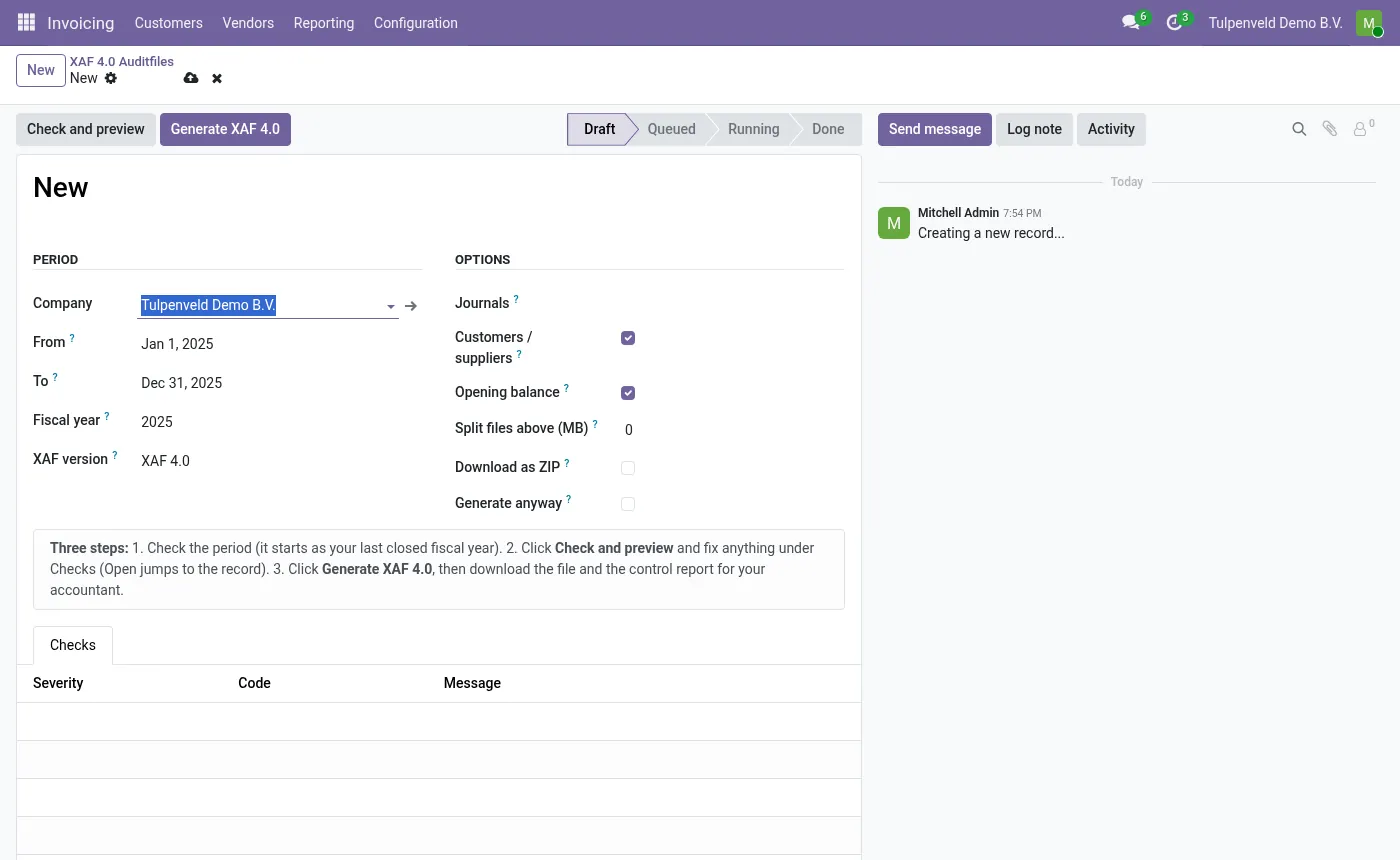
- Open Accounting › Reporting › XAF Auditfile › XAF 4.0 Exports and click New. The period starts as your last closed fiscal year; any date range works, including a broken fiscal year.
- Click Check and preview. Fix anything the pre-flight check lists (each item links to the record). You can already print a preview control report.
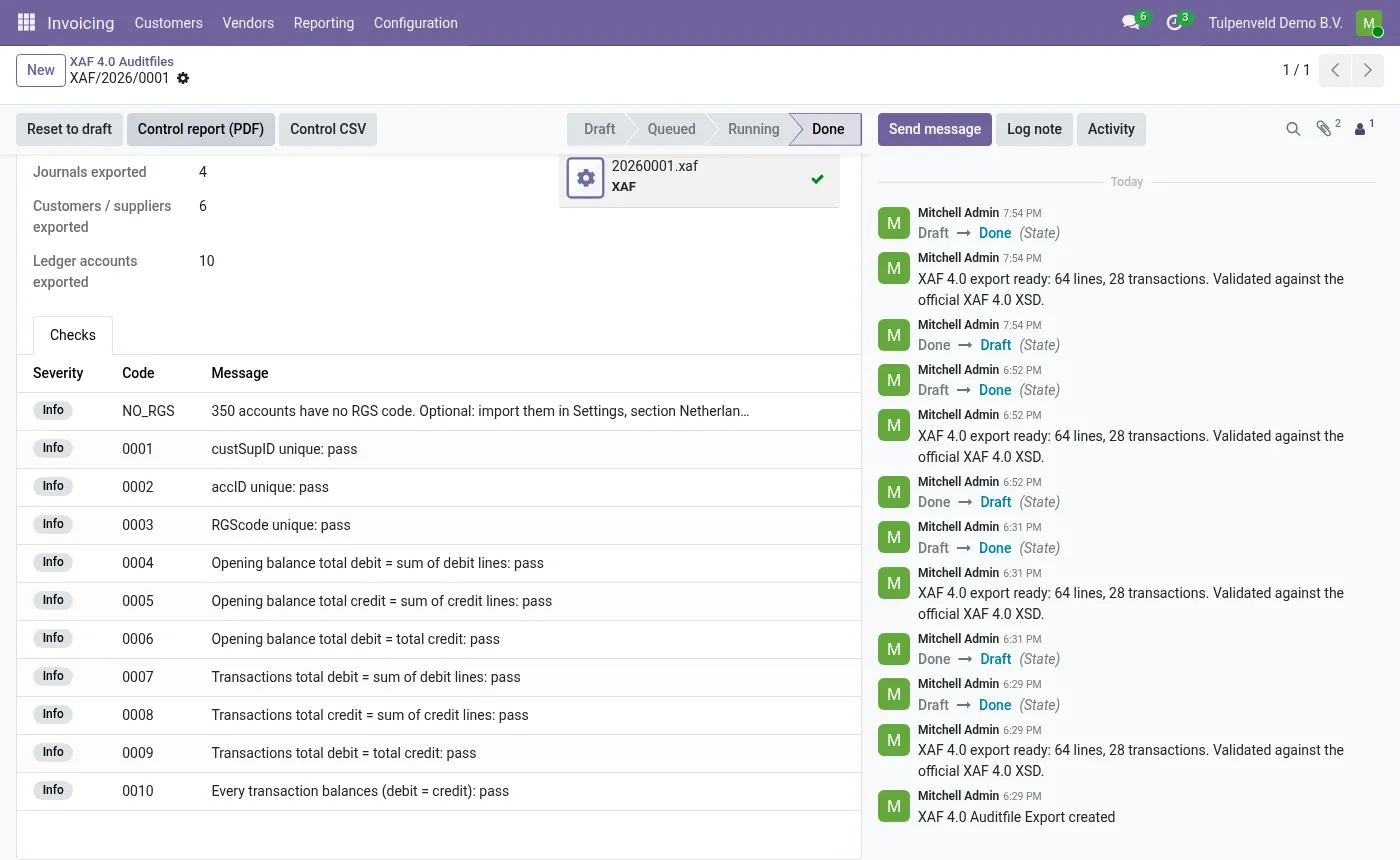
- Click Generate XAF 4.0. Check the Checks tab: XSD and consistency rules 0001–0010, each pass or fail.
- Download the
.xaf(or ZIP) and print the Control report (PDF) for your accountant. - Received a file from elsewhere? Use XAF Auditfile › Validate an XAF file.
Screenshots
All screenshots show fictitious demo data.
FAQ
Is the file accepted by the Belastingdienst?
Every file is validated against the official XAF 4.0.3 XSD and the consistency rules 0001–0010. It has not been run through the Belastingdienst validation test service, and the module is not a Belastingdienst certification. It helps you produce the auditfile; it is not tax advice.
Can I check the numbers before generating?
Yes. The pre-flight check computes totals, the opening balance and a trial balance, which you can print as a control report or download as CSV, marked as preview.
Does it support XAF 3.2?
No. XAF 4.0 only.
What if my books contain draft or unbalanced entries?
The pre-flight check blocks generation and links to each entry. You can tick Generate anyway if you knowingly want a file of the posted entries only.
Multi-company?
Yes. Each export belongs to one company and only contains that company's data.
Does it send data anywhere?
No. Everything runs inside your Odoo. No external services, no telemetry, no licence key.
Does it work on Odoo Online?
No. Odoo Online does not allow third-party modules. Use Odoo.sh or an on-premise installation.
How do I install it?
Buy it for your Odoo version and download the zip from the store (or later from your orders page). Copy the folder into your addons path, update the apps list and install. On Odoo.sh, commit the folder to your repository. The Install section has every step.
What happens when I upgrade Odoo?
Since Odoo 13 the Odoo Apps Store sells each Odoo version of a module separately, so a new major version means buying the module for that version. Bug-fix updates within your version are free: download the latest zip from your orders page and replace the folder. Email us before a major upgrade and we will share any migration notes.
How quickly do you answer support?
Email support@normalane.com or use the support button on your Odoo Apps Store orders page. A person reads every message and replies on working days (CET). Bug fixes for the purchased version are free.
Ready to use Dutch Auditfile XAF 4.0?
€19, one-time, per Odoo version. Bought and downloaded on the Odoo Apps Store.
In het Nederlands
Exporteer de Auditfile Financieel in XAF 4.0 rechtstreeks vanuit Odoo. Ieder bestand wordt gevalideerd tegen de officiële XAF 4.0 XSD en de consistentieregels 0001–0010. Met pre-flight controle, PDF-controlerapport met proefbalans, RGS-import, optionele splitsing, ZIP en SHA-256.
Need help?
Email support@normalane.com with your Odoo version and edition (Community or Enterprise). Bug fixes for the purchased Odoo version are free.
Independent module, not affiliated with or endorsed by the Belastingdienst or Odoo S.A.