What changes when FIRE retires
FIRE (Filing Information Returns Electronically) has long been the IRS system for sending 1099 files. The IRS is retiring it, and its FIRE page sets out what that means:
- The IRS no longer accepts new FIRE applications for a Transmitter Control Code (TCC).
- Current FIRE users must complete an IRIS Application for TCC and move to IRIS to file tax year 2026 information returns during the 2027 filing season.
- After January 1, 2027, IRIS is the only electronic filing system for information returns, for the current year, prior years and corrections.
A FIRE TCC does not carry over. Publication 5717 says TCCs obtained for FIRE (or for IRIS A2A) cannot be used in the IRIS Taxpayer Portal: you need an IRIS Taxpayer Portal TCC, which starts with the letter D. The same publication asks you not to file identical returns in more than one system, because that is a duplicate filing.
Do you have to e-file? Yes, if you file 10 or more information returns in total (all types added together, Forms W-2 included). The Instructions for Forms 1099-MISC and 1099-NEC explain that this threshold of 10 applies to returns due on or after January 1, 2024. Below 10, paper is still allowed.
Key dates
| Date | What happens | Source |
|---|---|---|
| Nov. 1, 2026 | Last day to send test files through the FIRE Trading Partner Test System. | IRS FIRE page |
| Nov. 9, 2026 | Last day to change an existing FIRE application for TCC. | IRS FIRE page |
| Nov. 19, 2026, 3 p.m. ET | Last day to file information returns through FIRE. | IRS FIRE page |
| Jan. 1, 2027 | After this date IRIS is the only e-file system for information returns. | IRS FIRE page |
| Feb. 1, 2027 | Form 1099-NEC for tax year 2026 due to the IRS and to recipients. The rule is January 31; in 2027 that is a Sunday, so the due date moves to the next business day. | Instructions (Rev. 12/2026) |
| Mar. 31, 2027 | Form 1099-MISC for tax year 2026 due to the IRS when filed electronically (February 28 on paper). | Instructions (Rev. 12/2026) |
ET is US Eastern Time. If a due date falls on a Saturday, Sunday or legal holiday, it moves to the next business day (Instructions for Forms 1099-MISC and 1099-NEC, “Filing dates”).
Get your IRIS TCC first: allow up to 45 days
To use the IRIS Taxpayer Portal you need an IRIS TCC, a five-character code that starts with D. You request it with the IRIS Application for TCC. The IRS e-file page warns that processing may take up to 45 days, and Publication 5717 says to allow up to 45 calendar days. The IRIS FAQs add that it is usually done within 24 hours, but you cannot count on that in January.
- Issuer: you only file for your own company, and the EIN must match the EIN on the application.
- Transmitter: you also file for other businesses, as a bookkeeper or accounting firm does.
- The responsible official named on the application can see the assigned TCCs. You can check the status on the Application Summary page.
Apply now. With up to 45 days of processing, an application started in January can end after the 1099-NEC deadline.
How the IRIS Taxpayer Portal CSV works
The IRIS Taxpayer Portal is free. You can type each form in, or use Upload CSV with Form Data. Publication 5717 (section 3.5) sets the rules for the CSV file:
- one form type and one tax year per file;
- at most 250 forms per file, header row not included;
- only the CSV templates provided by the IRS can be used. You download them in the portal, and a new template each time is recommended;
- save the file as CSV UTF-8 (comma delimited);
- the portal submits up to 100 forms at a time, and you can download recipient copies there.
The IRS also publishes CSV formatting guidelines per tax year on its IRIS page.
Step by step in Odoo Community
Our app US 1099-NEC IRIS Export (l10n_us_1099_iris) adds a 1099 declaration to Odoo Accounting / Invoicing. It works out what you actually paid each contractor and writes the CSV for the portal. It only depends on the account module and is built and tested on Odoo 17, 18, 19 and 20 Community.
- Install the app, then open Accounting / Invoicing › Reporting › US 1099 (IRIS) › Setup. Enter your EIN and check the company address.
- On each contractor, tick 1099 Vendor and copy their Form W-9 into the 1099 / W-9 tab: TIN type and number, legal and business name, tax classification, exempt payee and FATCA codes, W-9 date. SSN, ITIN and EIN formats are checked.
- Map your expense accounts (or single vendors) to 1099 boxes, for example 1099-NEC box 1a. If you backup-withhold, map the withholding account to “Federal income tax withheld” (box 4).
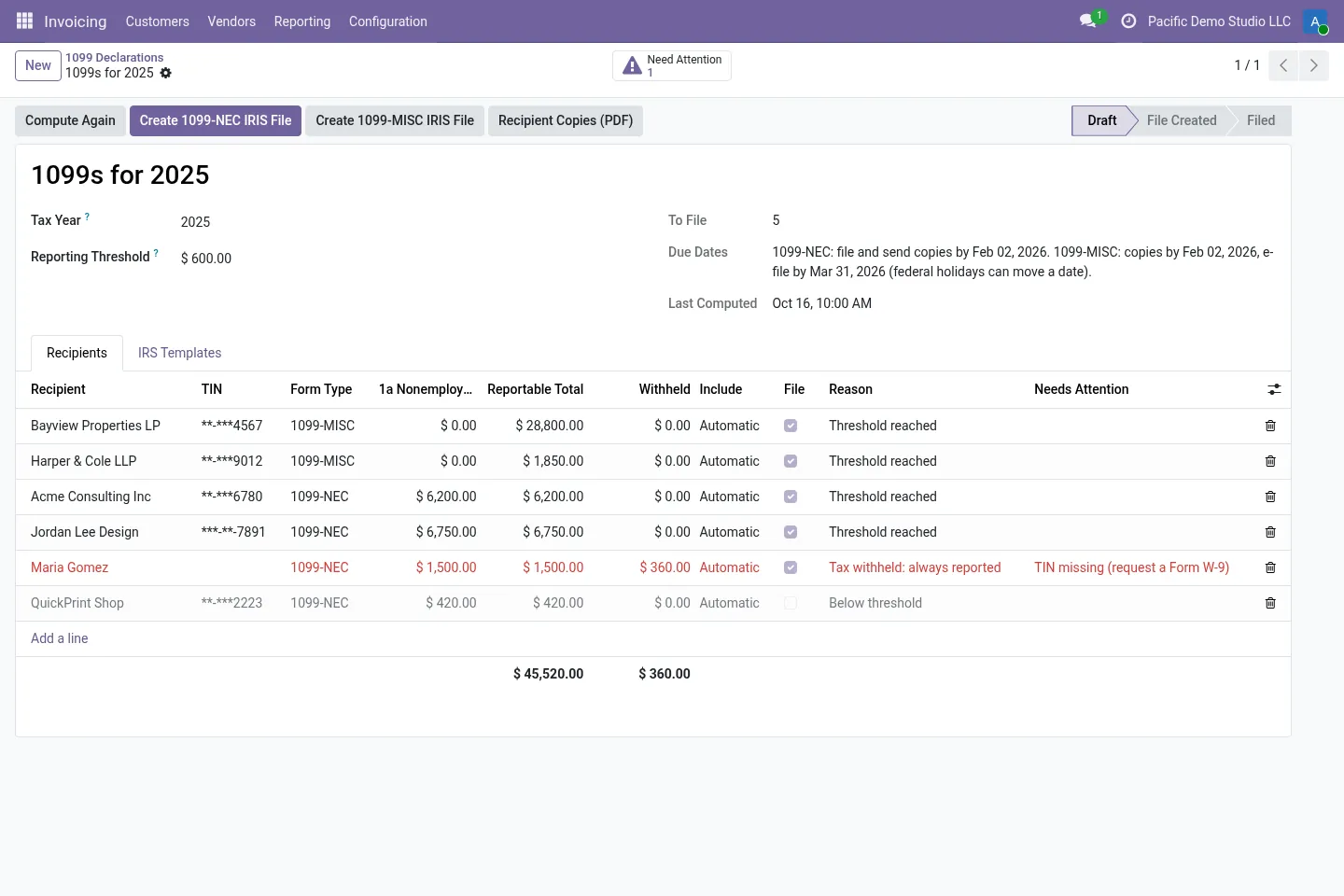
- Go to US 1099 (IRIS) › 1099 Declarations, create the declaration for 2026 and click Compute. A bill counts in the year you pay it, partial payments and vendor refunds included. Card and payment-app journals can be left out, because those payments belong on the processor's Form 1099-K. The $2,000 threshold for payments made in 2026 is applied.
- Review the recipients. Fix anything under Need Attention and check Unmatched Payments.
- In the IRIS Taxpayer Portal, download the blank 1099-NEC template and attach it on the IRS Templates tab. The app keeps the template's header row exactly as it is and fills every column it recognises. Columns it does not recognise stay empty and are listed so you can check them.
- Click Create 1099-NEC IRIS File (and Create 1099-MISC IRIS File if you have MISC payments). Above 250 recipients you get a ZIP with several files.
- Upload the file with Upload CSV with Form Data, review and submit it in the portal, and keep the acknowledgements. Then print or send the Recipient Copies (PDF), where the recipient TIN is truncated (***-**-1234), and click Mark as Filed.
What stays with you
The app prepares the files. It does not file anything. These steps stay with you or your accountant:
- requesting the IRIS TCC, logging in to the portal, submitting the files and keeping the acknowledgements;
- sending Copy B to recipients;
- state filings outside the Combined Federal/State Filing program;
- IRIS A2A (XML) transmission, which is not included;
- checking that the figures are right. Federal holidays are not taken into account in the due dates the app shows.
Made for Odoo Community. Odoo's own US localisation lists a 1099 report and a NACHA module (Odoo documentation). They are part of Odoo Enterprise, not of the Community source code. This app is for Odoo Community databases, self-hosted or on-premise, which do not have them. We test it on Community only and make no Enterprise claim (Odoo.sh runs Odoo Enterprise).
Ready to use US 1099-NEC IRIS Export?
€19, one-time, per Odoo version. Bought and downloaded on the Odoo Apps Store.
Frequently asked questions
Can I still use FIRE for my tax year 2026 forms?
No. The last day to file through FIRE is November 19, 2026, and the IRS says tax year 2026 information returns are filed through IRIS in the 2027 filing season.
Does my FIRE TCC work in IRIS?
No. The IRIS Taxpayer Portal needs its own IRIS TCC, which starts with D. Publication 5717 says TCCs obtained for FIRE cannot be used in the portal.
How long does the IRIS TCC take?
The IRS says to allow up to 45 calendar days. It is often assigned within 24 hours, but apply well before you need to file.
What is the 1099-NEC threshold for 2026?
$2,000 for payments made in tax years beginning after 2025 (it was $600 before). Any federal income tax withheld under backup withholding is reported whatever the amount.
When is Form 1099-NEC for tax year 2026 due?
The rule is January 31, for both the IRS filing and the recipient statements. January 31, 2027 is a Sunday, so the due date is Monday, February 1, 2027.
Does the app send the forms to the IRS?
No. It creates the CSV for the IRIS Taxpayer Portal and the recipient copies. You upload and submit the file in the portal yourself.
Does it work on Odoo Enterprise or Odoo Online?
It is made and tested for Odoo Community, self-hosted or on-premise. Odoo Enterprise (which Odoo.sh runs) has its own 1099 report, and we make no Enterprise claim. Odoo Online does not allow third-party modules.
Official sources
Each link goes to the official page or publication the facts above come from.
- IRS: Filing Information Returns Electronically (FIRE), page updated 12 Oct 2026 · FIRE retirement, the Nov. 1, 9 and 19, 2026 dates, IRIS as the only e-file system after Jan. 1, 2027
- IRS: E-file information returns with IRIS · IRIS Taxpayer Portal, CSV upload and recipient copies, formatting guidelines per tax year
- IRS: E-file information returns · TCC processing up to 45 days, IRIS TCCs start with D, e-filing required for 10 or more returns
- IRS: IRIS Application for TCC · Where to apply for the IRIS TCC
- IRS Publication 5717 (Rev. 9-2026), IRIS Taxpayer Portal User Guide · Allow up to 45 calendar days, FIRE TCCs not valid in the portal, CSV rules (section 3.5), 100 forms per submission
- IRS: Information Returns Intake System FAQs (PDF) · TCC usually within 24 hours, Issuer and Transmitter roles
- IRS: Instructions for Forms 1099-MISC and 1099-NEC (Rev. 12/2026) · $2,000 threshold, due dates, e-file threshold of 10, new boxes for tax year 2026
- Odoo documentation: United States localisation · Odoo's own 1099 report and NACHA modules (not in Odoo Community)
Email support@normalane.com with your Odoo version and edition (Community or Enterprise). Bug fixes for the purchased Odoo version are free.
This guide explains public rules in plain language. It is not legal or tax advice. Normalane is not affiliated with the IRS.