What changes on 1 January 2027?
On 22 April 2026 the ODB (Ondersteuning Digitaal Berichtenverkeer) of the Belastingdienst published this on behalf of the Auditfile Financieel working group (Dutch):
- Deadline: from 1 January 2027 only the XAF 4.0 format is accepted for delivery. Older versions are no longer wanted from that date.
- Simpler: XAF 4.0 has been reduced to 90 fields.
- RGS: RGS (the Dutch reference chart of accounts) does not block the switch. It must be included only if the software already has it.
- Advice: start early, so the switch goes smoothly in the fourth quarter of 2026.
The technical specification (XSD and documentation) is on the ODB page XML Auditfile Financieel XAF 4.0.3.
Which XAF version does your Odoo export today?
Open an exported .xaf file in a text editor and look at the first lines. An XAF 4.0 file names XmlauditfileXAF_4.0 in its namespace. If it shows an older version, such as 3.2, you need to switch before 1 January 2027.
- Odoo Enterprise: according to the Odoo documentation for the Netherlands, you export via Accounting › Reporting › General Ledger, gear icon, XAF. The documentation does not name a version, so check the file itself.
- Free OCA module (
l10n_nl_xaf_auditfile_export): according to its OCA page, the exported version is 3.2, for Odoo up to 18.0 (checked on 18 October 2026). - Odoo Online: third-party modules cannot be installed there, so you depend on what Odoo itself provides.
What you can do now
- Ask your accountant in which format and for which period they want the auditfile for financial year 2026.
- Check that your company in Odoo has its Chamber of Commerce registration number and VAT number filled in.
- Post or delete draft entries in the period and check that all entries balance.
- Do you use RGS codes? Keep them per general ledger account. If you don't, the ODB says that does not block the switch.
- Before the end of 2026, make a test export in XAF 4.0 and have your accountant import it.
Step by step in Odoo with Dutch Auditfile XAF 4.0
Our app Dutch Auditfile XAF 4.0 (l10n_nl_xaf4_auditfile) produces the auditfile in XAF 4.0 from the books you already keep in Odoo. It works on Odoo 17, 18, 19 and 20, Community and Enterprise, on Odoo.sh or on-premise.
- Install the app. Fill in the company's Chamber of Commerce registration number and VAT number.
- Optional: set RGS codes on your accounts, one by one or with Import RGS codes in Settings › Invoicing/Accounting › Netherlands XAF 4.0. The import shows a preview first.
- Open Accounting › Reporting › XAF Auditfile › XAF 4.0 Exports and click New. The period starts as your last closed fiscal year; any period works, including a broken fiscal year.
- Click Check and preview. The pre-flight check lists draft or unbalanced entries, a missing registry or VAT number and accounts without an RGS code, each linked to the record.
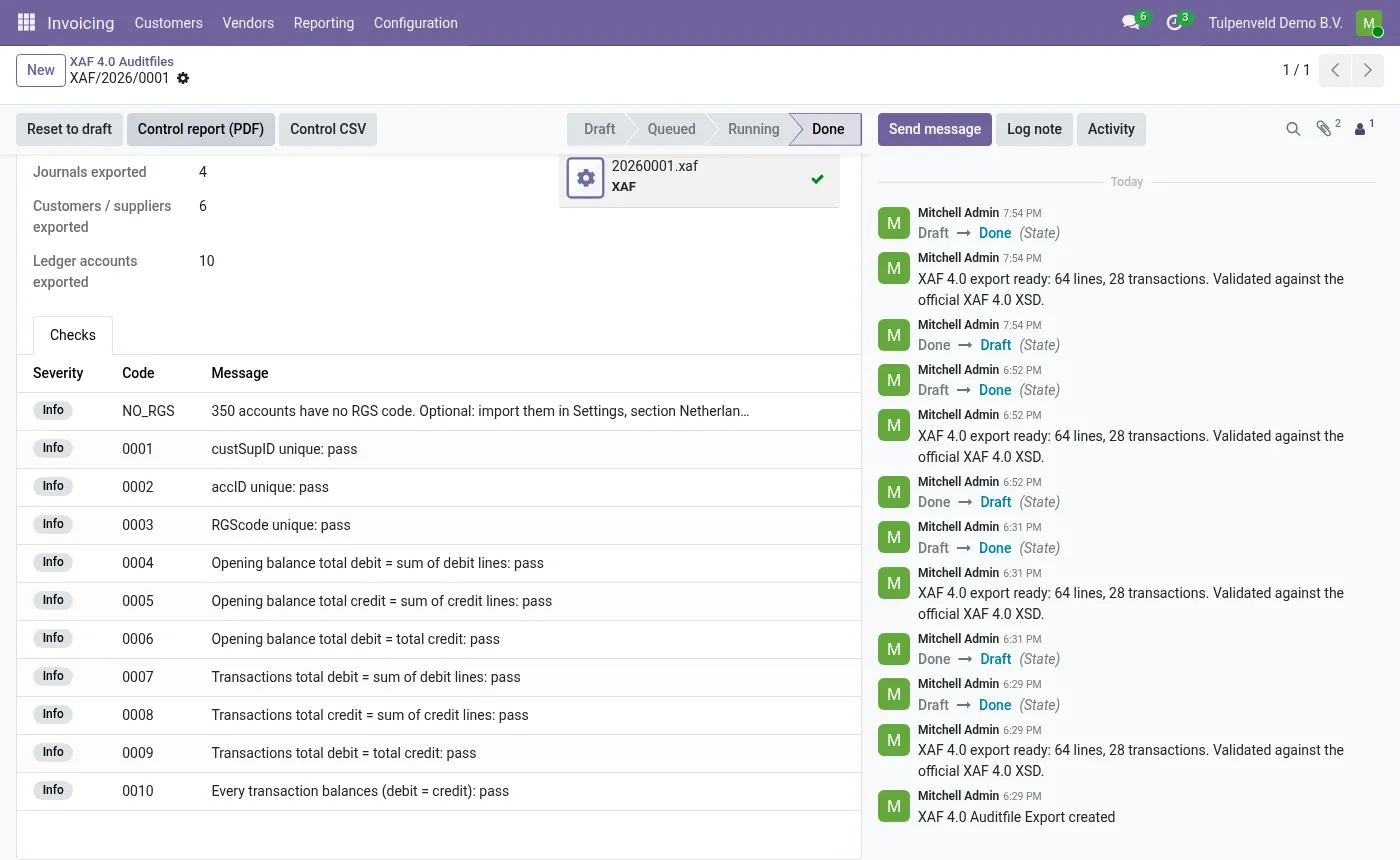
- Click Generate XAF 4.0. The file is validated against the official XSD 4.0.3 and the consistency rules 0001–0010; the Checks tab shows pass or fail per rule.
- Download the
.xaf(or ZIP) and print the Control report (PDF) for your accountant, with a trial balance, totals per journal and period, and the SHA-256 of every file. - Received a file from elsewhere? Check it with XAF Auditfile › Validate an XAF file. The file is only read, not stored.
What the app does not do
- It exports XAF 4.0 only, not XAF 3.2.
- It has not been run through the Belastingdienst validation test service and is not a Belastingdienst certification.
- It sends nothing: no tax return, no data to the Belastingdienst or to Normalane. You hand the file to whoever asks for it.
- It does not replace your accountant and is not tax advice.
- It does not run on Odoo Online, which does not allow third-party modules.
Ready to use Dutch Auditfile XAF 4.0?
€19, one-time, per Odoo version. Bought and downloaded on the Odoo Apps Store.
Frequently asked questions
Is XAF 4.0 mandatory from 1 January 2027?
The Belastingdienst's ODB says that from 1 January 2027 only XAF 4.0 is accepted for delivery and that older versions are no longer wanted from that date.
Do I need RGS codes for XAF 4.0?
No. According to the ODB, RGS does not block the switch. It must be included only if your software already has it.
How do I see which XAF version my export has?
Open the .xaf file in a text editor. An XAF 4.0 file names XmlauditfileXAF_4.0 in the namespace on its first lines.
Does the free OCA module export XAF 4.0?
On 18 October 2026 its OCA page says the exported version is 3.2, for Odoo up to 18.0.
Does the Belastingdienst accept the app's file?
Every file is validated against the official XAF 4.0.3 XSD and the consistency rules 0001–0010. The app has not been run through the Belastingdienst validation test service and is not a certification.
Does it work on Odoo Online?
No. Odoo Online does not allow third-party modules. Use Odoo.sh or your own installation.
Official sources
Each link goes to the official page or publication the facts above come from.
- ODB Belastingdienst: phase-out of old Auditfiles Financieel XAF from 01-01-2027 (22-04-2026, Dutch) · From 1 January 2027 only XAF 4.0, 90 fields, RGS no blocker, advice: switch in Q4 2026
- ODB Belastingdienst: XML Auditfile Financieel XAF 4.0.3 (Dutch) · Official XAF 4.0.3 specification and XSD
- Odoo documentation: Netherlands · XAF export via the General Ledger in Odoo, version not stated
- OCA Apps Store: XAF auditfile export · Free OCA module; exported version 3.2; Odoo up to 18.0
Email support@normalane.com with your Odoo version and edition (Community or Enterprise). Bug fixes for the purchased Odoo version are free.
This guide explains public rules in plain language. It is not legal or tax advice. Normalane is not affiliated with the Belastingdienst or the Auditfile Financieel working group.